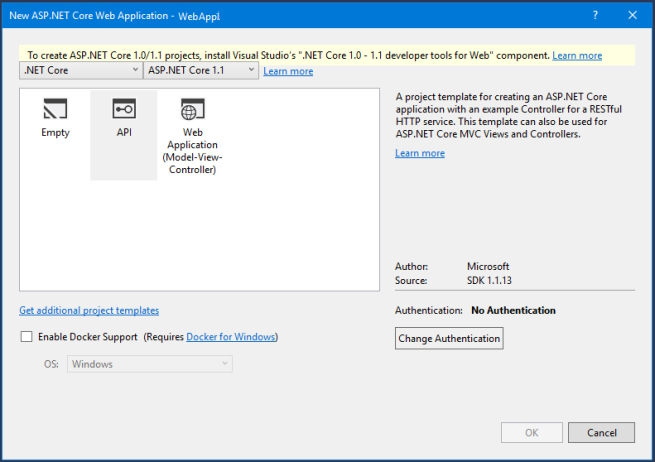
I wanted to see the original code created from the Visual Studio 2017 ASP.NET Core 1.1 Web Application template, for code comparison. When it comes to the template selection Window, it gives the following message, as shown inthe picture below:
To create ASP.NET Core 1.0/1.1 projects, install Visual Studio’s “.NET Core 1.0 – 1.1 developer tools for Web” component
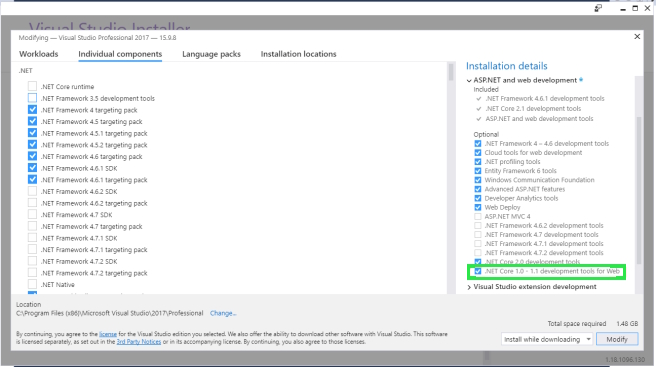
As suggested by the highlighted message, open the Visual Studio installer 2017. Then select the "Individual components" tab and scrolling down the left pane will not help to see the “.NET Core 1.0 – 1.1 developer tools for Web”, instead check the right pane "Installation details" section and expand the "ASP.NET and Web Development" list item. And then “.NET Core 1.0 – 1.1 developer tools for Web” can be found under the “Optional” heading.